- DATE:
- AUTHOR:
- The SaiSystems Team
March 1st Release (3am to 6am eastern)
PacEHR System – March 1st , 2026, Release Notes
Introduction
The March 1st PacEHR software release delivers significant enhancements focused on access control, AI-powered documentation, interoperability, CCM workflows, and usability improvements across the platform. This release strengthens multi-facility visibility, improves provider efficiency, enhances data accuracy, and resolves key workflow issues identified by clients and internal teams.
New Features & Enhancements
1. Business Hierarchy: Custom Groups with TIN / PHI Control
This feature introduces a structured business hierarchy that allows clients to define groups within an account for improved organization and access control. Users and providers can be assigned to one or more groups, and access to locations, users, and data is automatically filtered based on group membership. This ensures users only see relevant facilities and patients, reducing confusion and improving data security. The hierarchy applies consistently across scheduling, encounters, reports, and dashboards. It is especially valuable for organizations operating across multiple buildings or regions. Administrators gain centralized control while maintaining flexibility for shared users. Overall, this improves scalability and access governance.
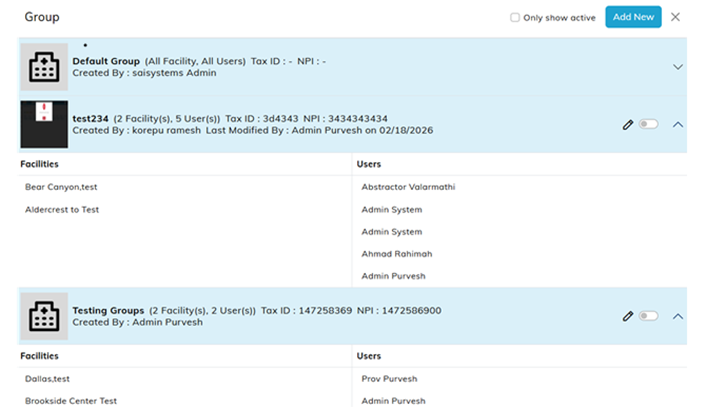
* Future: Ability to separate MIPS / ACO data be groups
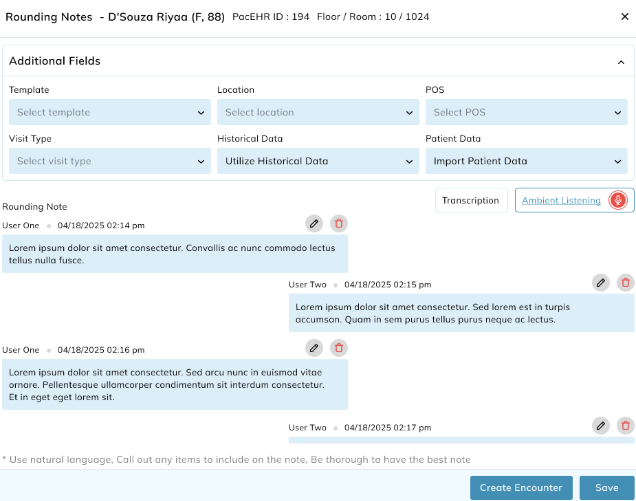
2. Ambient Listening
Ambient Listening enhances clinical documentation by capturing real-time conversations between providers, patients, and care team members. Saisystems has implemented ambient listening with Google Medical Conversations, offering improved reliability and transcription as well as advanced features such as multi-speaker identification. Providers can start, pause, resume, and supplement recordings using transcription or rounding notes. The system timestamps each segment and stores audio securely for audit purposes. Captured speech is fully editable, allowing providers to remove irrelevant content or correct inaccuracies. AI combines spoken and typed content to generate structured encounter documentation. This reduces documentation burden while improving accuracy and completeness. The feature supports multi-speaker scenarios and integrates seamlessly into existing workflows.
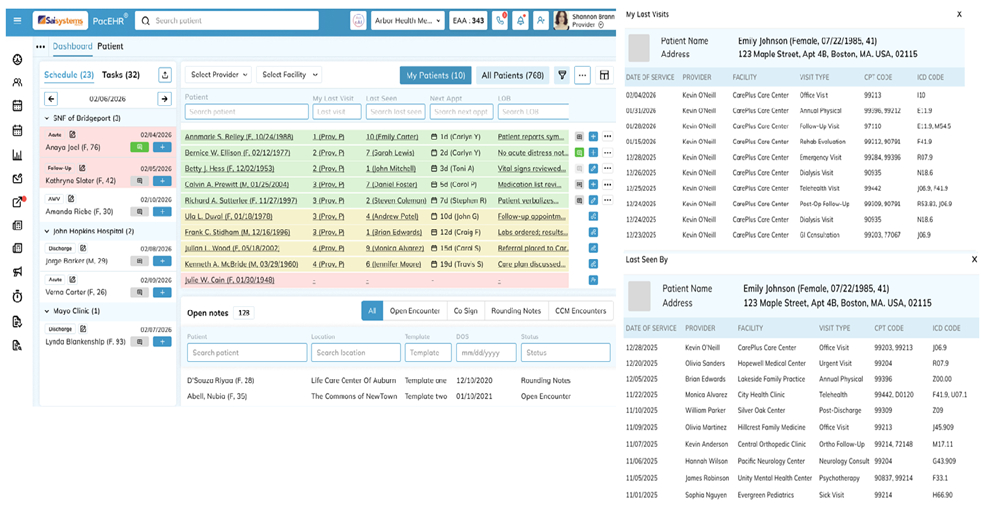
3. Provider Dashboard Update
The improved Dashboard improves visibility and workflow efficiency for multi-provider and multi-facility organizations. Authorized users can view schedules, appointments, and patient activity across locations from a single screen. Appointment creation is now streamlined directly from the dashboard, reducing navigation steps. The dashboard supports providers, medical assistants, admins, and others who assist with day to day management of multiple providers. Filters and views help users quickly focus on relevant patients and tasks. This enhancement reduces operational friction and improves coordination across teams. It also lays the foundation for future AI-driven insights.
New Functions:
o Add / Edit Schedules from this one screen
o View details on past encounter notes (CPT codes, ICD Codes, Visit Types, etc)
o Easy Link patients for Integrated buildings
o Easy Import for new patients in Integrated buildings
o Showing missed appointments on the ‘Schedule’ section
4. Encounter (template) – Carry Forward Exclusions (Auto-import previous notes)
Carry Forward functionality has been enhanced to allow greater Practice-level control at the section and field levels within encounter templates. Previously, there were no restrictions. Administrators can now work with their Saisystems support team to configure exactly which sections and fields are eligible for carry forward, set up via Saisystems support. Only enabled content appears in new encounters, improving note relevance. This helps providers focus on current clinical information while preserving meaningful historical context. The enhancement improves documentation quality and reduces the risk of outdated information.
5. Improved CCM Enrollment Logic
The CCM enrollment workflow now leverages verified insurance data from RCM systems and Practice Management systems instead of relying solely on PacEHR or Facility data. Hard stops for Medicaid-only patients and patients with fewer than two system-defined chronic conditions have been replaced with soft stops. Users can proceed with enrollment after explicit confirmation, improving flexibility. Enrollment metadata such as “Enrolled By,” “Enrollment Date,” “Consented By,” and “Consented Date” are now clearly visible for audit purposes. Consent attribution remains intact even if billing providers change. These updates improve accuracy, transparency, and compliance while reducing workflow disruption.
6. Improved CCM Dashboard Appearance
Activities: History display on the Patient CCM screen has been improved for better usability. Activities from the current and immediately previous calendar month now expand automatically upon screen load. Older activities are collapsed by default but remain accessible when needed. This approach ensures recent and relevant information is immediately visible without overwhelming the user. It improves efficiency for care managers reviewing ongoing patient engagement. The behavior is consistent across care plan reviews, patient contacts, and CCM activities. This results in a cleaner and more intuitive CCM experience.
Integrations & Interoperability
7. DrFirst iPrescribe Integration
Expanding upon the existing DrFirst integration, the PacEHR application now integrates with the DrFirst iPrescribe mobile app to synchronize medication activity performed outside the EHR. Prescriptions written via the iPrescribe mobile app are automatically reflected in the PacEHR patient chart. This eliminates discrepancies between what providers prescribe and what appears in PacEHR. It reduces reliance on manual refreshes and reconciliation. Providers gain confidence that medication lists are accurate and up to date. This integration improves patient safety and continuity of care. Current or new DrFirst customers may reach out to Saisystems to set up iPrescribe for their account.
8. Facility EHR Sync – New Encounter Data Load (Diagnosis codes)
When creating a new encounter, PacEHR software now automatically retrieves the latest Diagnosis (Dx) code data from connected EHR systems. Previously, users had to manually refresh or open individual tabs to trigger Dx data sync. This enhancement ensures encounters are created with the most current clinical information with less steps. It reduces workflow interruptions and eliminates guesswork around data freshness. The result is a smoother and more reliable encounter creation process.
9. IMO Diagnosis Specificity Enhancement (Problem List)
Diagnosis refinement has been expanded to allow providers to update previously documented ICD codes to more specific IMO-supported codes in the current encounter. This enhancement is no longer limited to diagnoses added from the problem list. Providers can refine codes directly from the patient chart and encounter screen. This supports accurate coding as conditions evolve over time. Improved specificity enhances billing accuracy, quality reporting, and longitudinal documentation. Historical linkage is preserved to maintain clinical continuity. This change aligns documentation with real-world clinical progression.
10. Automated Patient Match & Link (Facility Integration)
PacEHR now supports automated patient matching when connecting to new facilities or EHR vendors. The system evaluates patient records using name, date of birth, and address to calculate match confidence. High-confidence matches can be auto-linked, while partial matches are flagged for review. Administrators can bulk-link or manually review unmatched records. This significantly reduces manual one-to-one matching effort. The feature accelerates onboarding for new facilities and improves data continuity. It also minimizes duplicate patient records.
11. Address Book Improvement [Delete with Break-the-Glass]
Users can now delete contacts from the Address Book using a controlled “Break-the-Glass” workflow. This ensures deletions are intentional, authorized, and fully audited. Users must confirm the action and elevate their permission before proceeding. All deletions are logged for compliance and traceability.
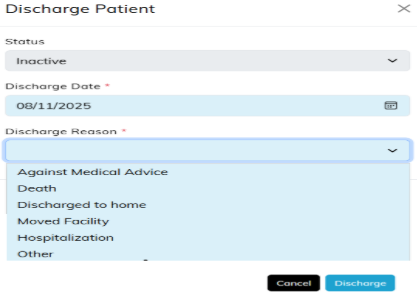
12. Auto-Inactivate Patient on Discharge
Patients are now automatically marked as inactive when a PacEHR discharge encounter containing specific CPT codes 99315 and 99316 is signed and closed. Prior to sign/close a confirmation pop-up captures discharge status, reason, and discharge date. Users can cancel discharge if needed before signing and closing the encounter. This automation ensures patient status accurately reflects care completion. It reduces manual updates and administrative oversight. The enhancement improves census accuracy and downstream reporting.
13. MIPS Measures for 2026
PacEHR has been updated with CMS MIPS measures for the 2026 performance year. Users can now select 2026 measures and begin documentation ahead of the reporting period. Measure logic, exclusions, and numerator/denominator rules reflect current CMS guidelines. This allows organizations to prepare early and avoid last-minute configuration changes. The benchmarks are not inside the system as of today, we will be updating this asap
14. Patient Alerts now popup on Encounter Screen
Patient alerts previously shown only on the patient chart now also appear in the encounter screen. Alerts are triggered from notes and displayed automatically when encounters are opened. Users can add, edit, or delete alerts directly from the alert popup, allowing for personalized, individual settings while keeping global alerts intact for others. This ensures critical patient information is visible at the point of care. Alerts remain consistent across chart and encounter views. The enhancement improves safety, awareness, and communication. It reduces the risk of missed critical information.
15. Phone System improvement [Favorites]
Users can now mark Address Book contacts as a favorites for calling workflows. Favorites are stored at the user level and do not affect other users. This allows quick access to frequently contacted providers, facilities, or care team members. The enhancement improves efficiency for users who rely heavily on calling features. It reduces search time and improves workflow personalization.
16. HIE Speed Improvements
The HIE integration has been optimized to improve speed and efficiency. The optimization enhances stability during high-volume data exchange. It also prepares the platform for future interoperability growth. To set up HIE data exchange for your account, contact Saisystems for more information.
Bug Fixes
1) Dashboard Patient List Sync
Fixed an issue where Facility favorite/unfavorite changes were not reflected correctly in the Dashboard patient list. Patient lists now update accurately based on selected favorite facilities.
2) CCM Pagination Persistence
Fixed pagination persistence when navigating between CCM tabs. Users now return to the previously selected tab and page instead of defaulting to Enrolled.
3) Dark Theme Select Visibility
Resolved display issues where dropdown values were not visible under dark theme settings. All ng-select elements now render correctly across themes.
4) MFA New Provider Workflow
Fixed an issue where some MFA-enabled users were not prompted to change passwords during first login. The password reset flow now triggers correctly after MFA verification.
6) Primary Insurance Display
Primary insurance is now correctly displayed in the patient banner and payer list. This resolves visibility gaps and improves insurance awareness during care delivery.
7) Day Sheet Report – Provider Filter Refresh
An issue was identified where changing the provider filter in the Day Sheet Report did not refresh the data correctly. This has been resolved, and the report now reliably reloads and displays data for the newly selected provider.
8) Patient Insurance Hierarchy Display
Patient insurance displayed in the patient banner now follows a clear hierarchy to ensure accuracy. The system prioritizes verified insurance from ECM and Practice Management systems, followed by Facility-level data, and finally PacEHR-entered insurance.
9) ECM to PacEHR Insurance ETL Sync
An hourly ETL process has been implemented to sync insurance data from ECM into PacEHR. This data now appears under Demographics → Payor Information as Practice Management insurance and is read-only to preserve data integrity.
10) PCC Naming Convention – Amendments
Encounters sent to PCC now correctly display the Billing Provider’s name instead of the logged-in user. This behavior has been validated across provider and admin workflows, including resending encounters from PCC.
11) Assessment List Sorting
The assessment list on both the patient screen and encounter screen is now sorted from newest to oldest. Backdated assessments were tested to ensure the most recent assessment consistently appears at the top.
12) Day Sheet by Provider Report – Zero Result Handling
Previously, switching to a provider with no results caused stale data to persist. This issue has been fixed, and the report now properly clears and reloads data when changing providers.
13) MD Activity Log – Carriage Return Issue
Entering line breaks in the MD Activity Log comments previously resulted in an unwanted “n” character. This issue has been resolved, and line breaks now display correctly as intended.
14) Case Load Report – Patients Due Today
Patients with appointments due on the current day were missing from the Case Load Report. This has been corrected, and today’s appointments now appear accurately in the report.
15) Appointments and Encounter Bi-Directional Sync
The data sync between LTC Scheduler appointments and Encounters has been enhanced to be bi-directional. Updates made in an Encounter—such as Provider, Date of Service, Location, POS, or Visit Type—now automatically carry over to the linked appointment, ensuring consistency across workflows.
16) CCM Notes Display Truncation
An issue was identified where CCM notes were intermittently truncated or not fully displaying, resulting in incomplete visibility of documented information. This has been fixed, and CCM notes now render in full as entered, ensuring accurate review and documentation continuity.
17) Referral Authorizations increased text size
An issue was identified where Authorization Numbers were being limited to 12 characters long, we have increased this to support up to 16 characters.
Conclusion
This March 1st release advances PacEHR by enhancing multi-facility access, improving AI-driven documentation, and strengthening interoperability and compliance workflows. These updates improve efficiency, data accuracy, and visibility across scheduling, encounters, CCM, and quality reporting. Performance optimizations and workflow refinements further enhance usability and reliability across the platform. Together, these improvements support regulatory alignment, operational scalability, and high-quality care delivery.
For questions, training, or support, please contact support@TheSNFist.com.
Thank you for your continued partnership as we continue to evolve.