- DATE:
- AUTHOR:
- The SaiSystems Team
Jan 11th Release Notes (3am to 6am eastern)
INTRODUCTION
The January 11 release introduces meaningful enhancements across patient visibility, clinical quality reporting, documentation workflows, secure communication, and system reliability. This release focuses on reducing manual effort, strengthening compliance with CMS eCQM requirements, improving provider efficiency, and enhancing real-time collaboration across integrated systems.
New Features
1. Patient List Inclusion – Non-Connected Patients in AI Dashboard
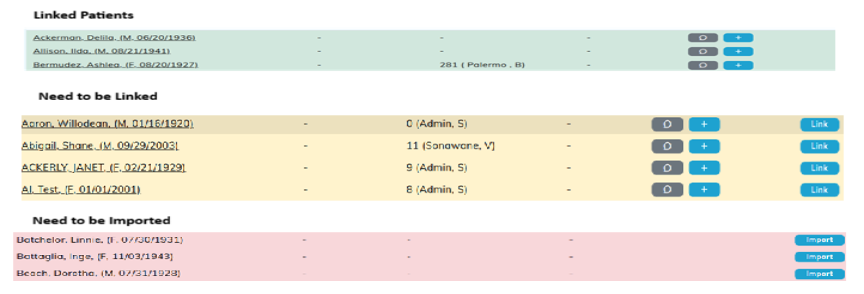
The Provider Dashboard has been enhanced to display a comprehensive patient list, including patients already in PacEHR, patients present in PCC but not yet imported, and patients requiring manual linking. This unified view improves visibility across integrated systems and reduces the need for manual reconciliation. Providers can now identify gaps in patient linkage more easily and act proactively. Overall, this enhancement streamlines workflow and improves operational efficiency.
2. Address Book Integration with Calling System
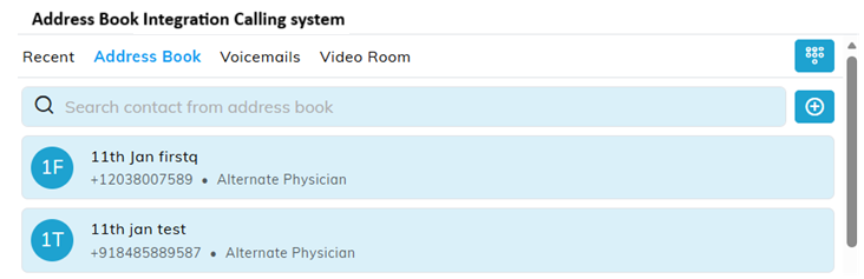
The Global Address Book has been integrated into the PacEHR calling system, enabling users to add and manage contacts directly within the application. Contacts saved to the account-level Address Book are now available for future outbound calls. This eliminates duplicate contact entry and ensures consistency across communication workflows. The enhancement improves calling efficiency and supports smoother provider and staff communication.
3. Outbound Faxing – Configurable Multi-Select (Requires signing up)
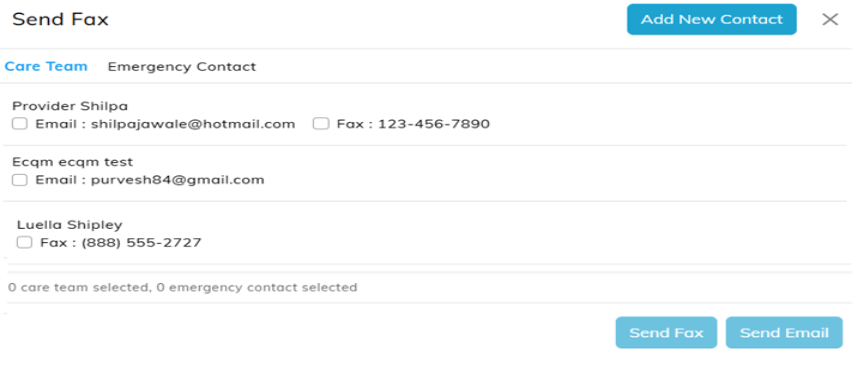
Outbound faxing is now available directly within PacEHR, allowing users to send documents via fax or secure email. Users no longer need to log into external portals, reducing manual steps and potential errors. Multi-select functionality enables sending documents to multiple recipients efficiently. This enhancement improves communication speed, security, and compliance. [This will require custom cover pages and some configuration]
4. PDF Transmission to Point Click Care – Miscellaneous Section
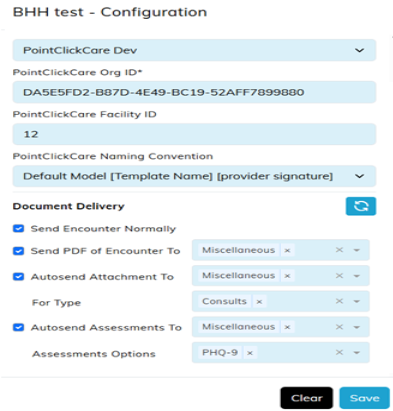
A new account level configuration allows PDF documents to be directly sent to designated folders, such as the PCC “Miscellaneous”. This enhancement supplements existing rich-text document transmission. It ensures recipients receive complete, well-formatted clinical documents. The feature improves interoperability and documentation fidelity across systems.
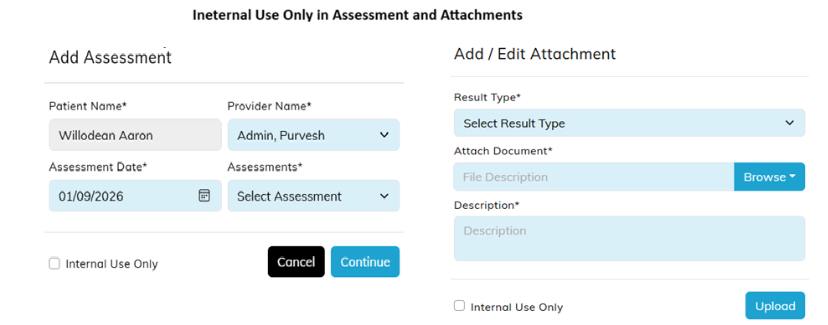
5. Document Sharing Control has been updated [Internal-Use-Only]
Assessments, attachments at the patient, and encounters, can now be flagged as “Internal Use Only”. Documents marked with this flag are excluded from outbound transmission to external systems such as PCC, even when auto-send is enabled. This provides document-level control over sensitive content. The enhancement balances automation with privacy and data governance requirements.
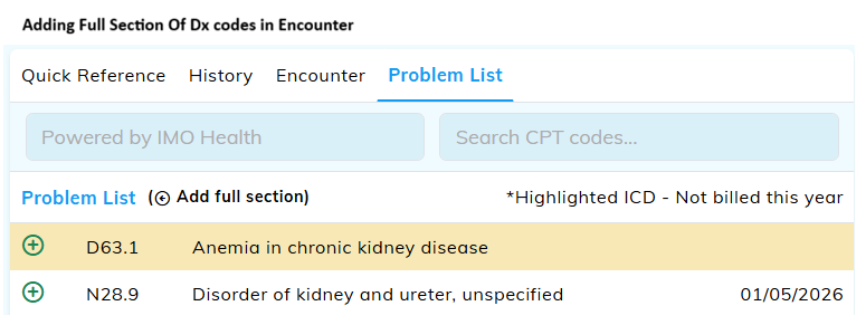
6. Problem List – Add Full Section to Encounter
In addition to selecting individual codes, Providers can now add all ICD-10 codes from the Problem List directly into a new encounter with a single action. This eliminates the need to manually select each problem individually, significantly reducing clicks and documentation time. The enhancement is particularly valuable for patients with chronic or persistent conditions. It streamlines encounter creation and improves documentation efficiency. Users should ensure that their problem list is optimized for billing purposes. [PacEHR does require the initial ICD-10 code to be placed prior to utilizing the all ICD Codes]
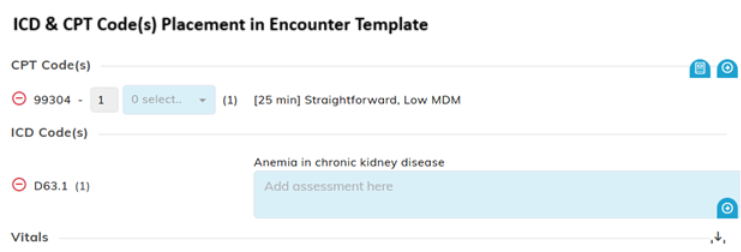
7. Template Enhancement – ICD & CPT Code(s) Placement
ICD and CPT code(s) sections are now movable, editable encounter template components. When templates are created, the ICD and CPT blocks can be repositioned within the template to align with encounter documentation preferences. This flexibility improves template usability and supports customized clinical workflows. [Work with your internal team and support to have your template updated]
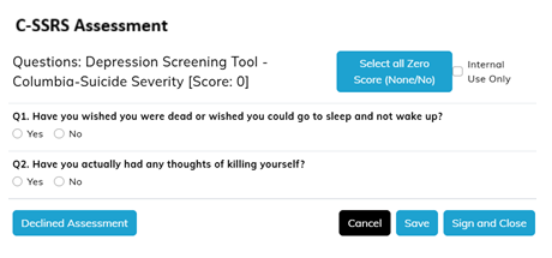
8. Depression Screening – Columbia Suicide Severity Rating Scale (C-SSRS) Assessment
The Columbia Suicide Severity Rating Scale (C-SSRS) has been added as a structured assessment within PacEHR. Based on responses, the system automatically calculates and categorizes suicide risk levels, including Low, Moderate, High, or No Risk Indicated. This ensures consistent, computable documentation of suicide risk. The enhancement expands assessment options and supports clinical decision-making and compliance with the Facility’s preferred screening survey.
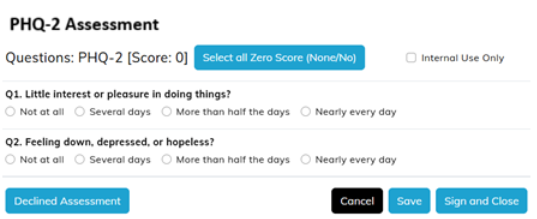
9. Depression Screening – PHQ-2 Assessment Integration
The Patient Health Questionaire-2 (PHQ-2) depression assessment has been added to PacEHR and integrated into the Depression eCQM logic. The assessment includes questions aligned with numerator follow-up requirements. Corresponding eCQM numerator logic has been updated to reflect these changes. This ensures accurate measure calculation, improved compliance, and standardized depression screening documentation.
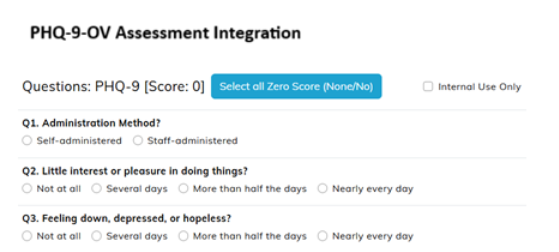
10. Depression Screening – PHQ-9-OV Assessment Integration within PHQ-9 Assessment
The Patient Health Questionaire-9 (PHQ-9) depression assessment has been enhanced to include a Method of Administration question, thus offering the ability to distinguish if the assessment is self-administered (patient self-report, PHQ-9) or staff-administered (staff observation, PHQ-9-OV). The default value for this question is self-administered (patient self-report).
Enhancements
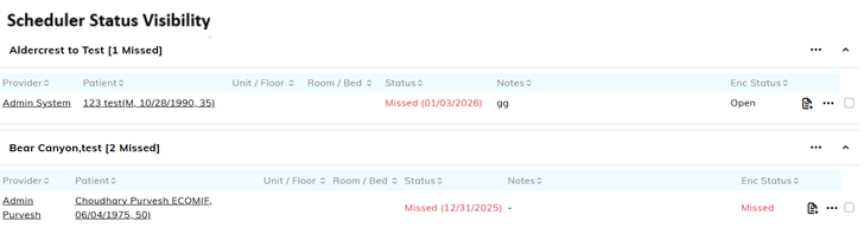
1. Scheduler Status Visibility
A new Status column has been added to the View Appointment and LTC Scheduler report screens. The column displays real-time encounter statuses such as Missed, Open, Pending Co-Sign, and Completed. This improves appointment tracking and operational awareness. Staff can now quickly identify encounter progress without navigating into individual records.
2. Diagnosis Removal Sync from PCC
When a diagnosis is corrected or removed in PCC, the update now synchronizes to PacEHR. With this enhancement, removed diagnoses are also removed from PacEHR. This ensures clinical accuracy and alignment between systems.
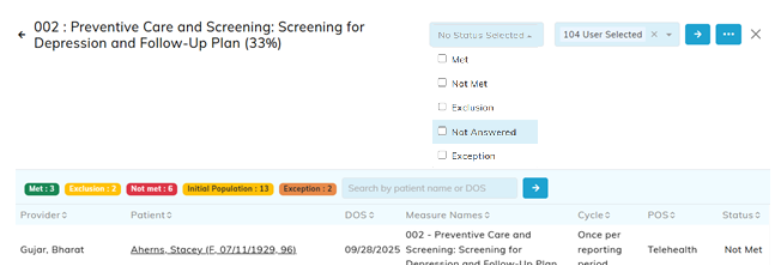
3. eCQM 002 – Exemption Logic
PacEHR now distinguishes between patients excluded from a measure due to ineligibility and those who declined an assessment. This enhancement aligns with CMS eCQM requirements and prevents providers from being penalized for patient-driven exceptions. It improves reporting accuracy and transparency. Providers can clearly see exclusions versus refusals in reports and summaries.
4. Standardized Payor Labeling
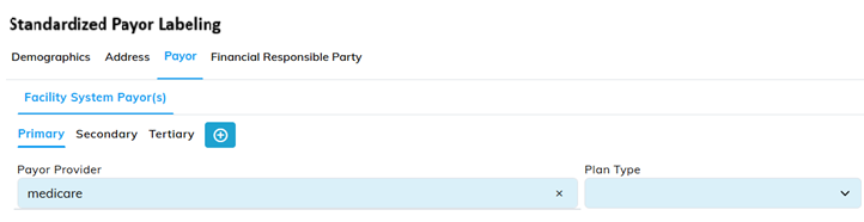
Facility System Payor labels have been standardized for consistency. “Third,” “Fourth,” and “Fifth” have been updated to “Tertiary,” “Quaternary,” and “Quinary,” respectively. These updates improve clarity and consistent terminology. The changes will be applied consistently across the system.
5. Terms of Use – Splash Screen Update
The PacEHR splash screen now includes a “Terms of Use” link alongside the Privacy Policy. The link is available on both web and mobile platforms. This ensures transparency and easy access to legal documentation. The enhancement supports compliance and user awareness.
6. CCM & Patient List State Persistence
Pagination, filters, tabs, and search states are now preserved across navigation in CCM and Patient Census screens. Previously, navigating away would reset filters and page selection. The system now restores the user’s previous state when returning. This significantly improves usability for large patient lists.
7. Location Search Enhancements
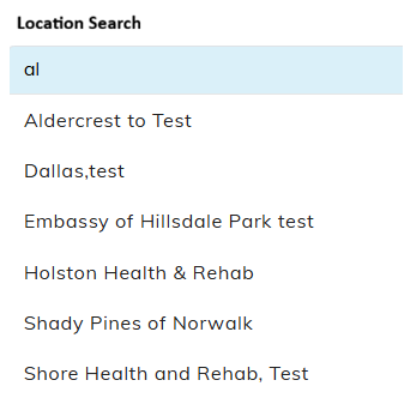
Location search functionality has been enhanced in the Provider Dashboard, Patient Demographics screen, and Create Encounter screens, enabling users to quickly find locations. This improves navigation speed and reduces user effort.
Bug Fixes
1. Patient Census Filter Accuracy
Patient census filters now use “contains” logic instead of exact match. This applies to text fields and search inputs. The fix ensures more accurate and expected filtering behavior. User experience is improved.
2. Custom CPT Group Re-Add Issue
Users can now re-add CPT codes to custom groups after deletion. Backend logic has been updated to consider active codes appropriately. Description mismatches have been resolved. The fix restores expected functionality.
3. Encounter Visit Type Defaulting
When creating an encounter, the visit type now correctly defaults from the associated appointment. This eliminates confusion and reduces manual correction. Workflow consistency is improved.
4. LTC Scheduler – Select All Fix
The “Select All” option now excludes completed appointments. Previously, completed and missed appointments were included. This fix ensures only eligible appointments are selected. Scheduling accuracy is improved.
5. Care Plan Special Character Handling
Users can now enter special characters when adding descriptions to the Care Plan tab. The error preventing save has been resolved. This improves documentation flexibility.
6. Point Click Care Patient Load Error
An error caused by quoted allergy data from PCC has been resolved. Patient information now loads correctly even when quoted values are present. This improves data reliability and integration stability.
Mobile Enhancement [Apple iPhone & iPad]
IMO Refinement – Encounter Problem List
IMO refinement functionality is now available in the mobile Encounter Problem List. Previously, this feature was limited to the Patient Problem List. Providers can now refine diagnoses consistently across mobile workflows. This improves accuracy and usability on mobile devices.
Conclusion
This January 11 release advances PacEHR software by expanding patient visibility, strengthening regulatory and quality reporting, and enhancing documentation, communication, and collaboration workflows. These improvements strengthen efficiency, regulatory alignment, and the overall performance of PacEHR software across the organization.
Thanks,
PacEHR Product Team
For questions, training, or support, please contact: support@TheSNFist.com
Thank you for your continued partnership as we evolve PacEHR software to support organizational performance and high-quality care delivery.