- DATE:
- AUTHOR:
- The SaiSystems Team
Nov 16th - Release (3am-6am eastern) UPDATE
PacEHR System – November 16th Release Notes
Release Date: 11/16/2025
The November 16th release introduces key advancements in user collaboration, encounter handling, care coordination, and coding accuracy across the PacEHR platform. Highlights include dynamic role switching, real-time multi-user documentation, consolidated mapping, and the new global Address Book. Enhancements to eCQM logic, CCM workflows, and reporting improve performance, compliance, and usability—empowering providers, administrators, and care teams to deliver more efficient and coordinated care.
NEW FUNCTIONALITIES
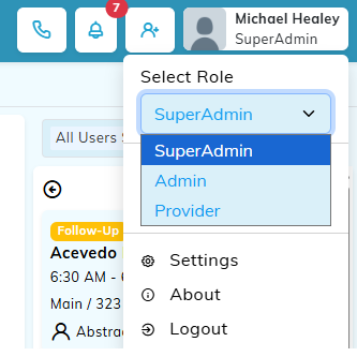
NEW Switching of User Profile
Users with multiple roles can now switch roles dynamically within PacEHR without logging out or re-authenticating. The selected role remains active for the day (until 12:00 AM local time) and can be switched as often as necessary, ensuring a seamless workflow. This enhancement saves time, reduces errors, and helps maintain audit integrity when users perform different functions such as provider, or admins during their day. It supports compliance requirements for MIPS, ACO, and EHR certifications by maintaining distinct role-based access controls.
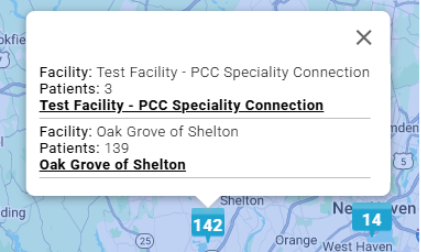
NEW Map Pin Consolidation
Overlapping facility pins at the same address are now consolidated into a single aggregated pin. This simplifies map navigation, allowing users to view a combined patient count and drill down by facility or building. The enhancement improves map clarity, reduces visual clutter, and supports quick decision-making for patient distribution and resource allocation across facilities.
NEW Address Book
A centralized Address Book is now available at both the global and account levels. Users can add, search, and link providers, specialists, and facilities directly to patient care teams. This feature promotes care coordination, reduces duplicate entries, and ensures that all team members access a single, reliable source of contact information. Integrated with patient screens, it allows dynamic linking and real-time updates, improving communication across multidisciplinary teams. [The Jan 2026 release will utilize this for sending encounters to outside medical groups such as referrals or notifying other PCPs)NEW ICD Code Refinement
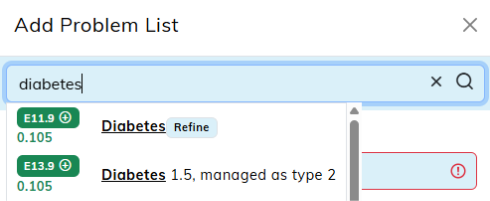
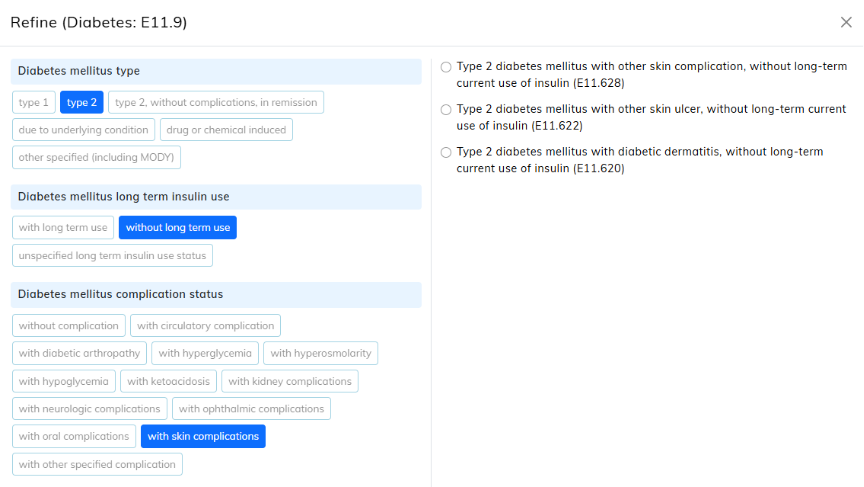
Providers can now add new diseases linked refine ICD-10 codes into more specific SNOMED-based codes using a guided decision-tree workflow. This feature enhances diagnosis precision and ensures coding evolves alongside disease progression. It preserves historical data while improving documentation accuracy for billing, clinical analytics, and compliance reporting. This refinement supports better tracking of chronic conditions and improved clinical outcomes. [Jan 2026 will include existing ICD Codes as well]
NEW Monthly ICD Code Update (Active/Billable)
PacEHR will now automatically update all ICD codes each month using IMO data, reflecting the latest billable and active status. This ensures that codes used for diagnoses and billing remain compliant with the most recent standards. The automation reduces manual maintenance effort, minimizes claim denials, and supports accurate reporting for revenue cycle management and compliance tracking. [This is a backend Task and not visible in the tools]NEW Patient Insurance View [Revenue Cycle Management Insurance]
Insurance data from the Revenue Cycle Management (RCM) system is now viewable on the Patient Census, Patient Chart, and Patient Editor screens. This integration enhances transparency between clinical and billing systems by showing accurate, up-to-date payer information. The fields are currently read-only to maintain data integrity, ensuring providers always have visibility into the insurance coverage linked to each patient. [Data will be visible in PacEHR by Friday 11/21/2025]

NEW Encounter workflow [Auto Open Next Encounter from Dashboard]
Providers can now enable the “Auto Open Next Encounter” option to automatically open the next encounter from their selected dashboard list (e.g., Open Notes, Co-signed Encounters or CCM Encounters). The ‘Next’ encounter is not based on the filter on the dashboard. The ‘Next’ encounter is the oldest encounter requiring completion / signature. This saves time by eliminating repetitive navigation back to the dashboard. The feature streamlines workflow for providers managing large caseloads and promotes continuous documentation during rounding or follow-up sessions.
Multi-User Real-Time Collaboration in Encounter
Multiple users, such as a provider and a scribe, can now access and document the same encounter simultaneously with real-time updates. This ensures that all changes are visible instantly, preventing data conflicts or overwrites. Providers retain full control over the encounter while enabling a smoother documentation workflow, supporting team-based care and improving clinical efficiency during high-volume periods. [This feature is no cost, but does require the support team to activate for your team. Please contact your Account Manager or support@thesfnist.com]
Enhancements
New Report: CPT Utilization
The CPT Utilization Report has been added to Clinical Reports. Admins can view reports for all users, while providers can view only their own. This provides a more streamlined experience for monitoring procedure utilization, optimizing productivity insights, and supporting billing audits and performance analysis.
Tasking System Enhancement
The tasking module now displays user-defined text for the “Other” task type instead of a generic label. This update makes task lists clearer, enhances reporting accuracy, and helps teams quickly identify task purposes during reviews or handoffs.
Laboratory Result Update
The Laboratory Results tab now correctly displays the actual result date rather than the order date. A dedicated Result Date column has been added to help providers track when results were received or entered into PacEHR. This refinement improves result monitoring, clinical follow-up, and reporting accuracy.
Chronic Care Management System
Activity Sorting: All activity lists are now alphabetically sorted, with “Other” always listed last for better navigation.
Activity Favorites: Users can mark frequently used activities as favorites for quicker access, improving efficiency during documentation.
Activity Done By: When an MA or Staff member adds an activity for another care team member, the correct member’s name now appears under “Activity Done By,” improving accountability and accuracy.
Separated Activities: “Review Care Plan” and “Patient Contact” are now individual activities, allowing clearer tracking of patient engagement.
Unenrollment Tracking: When patients are unenrolled, the event is logged as an activity and displayed in productivity reports if not billed, ensuring complete audit visibility.
Dashboard Sorting: Sorting options are now available for all columns, allowing users to customize their view and find patients more efficiently.
Enrollment Criteria: Patients now appear in eligibility recommendations only if they have two or more chronic conditions and active insurance (excluding Medicaid).
New Encounter Template: A new CCM encounter template automatically links all billed activities, goals, and reviews to encounters, ensuring consistency between care plan and billing documentation.
Date of Service Logic: The last captured activity date is automatically used as the encounter date of service for billing, reducing manual entry errors.
BUG FIXES
DX Assessment Cursor Issue: Fixed an issue where clicking inside the assessment box redirected focus to the CPT field. Users can now enter diagnoses seamlessly without repeated clicks.
Patient Reactivation Display: Resolved an issue for CCM where reactivated patients with prior data appeared under incorrect dashboard buckets. Patients now display accurately in their designated categories and productivity reports.
MIPS Questionnaire Popup: Fixed a bug that caused the MIPS questionnaire to appear for users without assigned measures, ensuring that assigned measures are displayed only to relevant users.
CONCLUSION
The November 16th release enhances PacEHR’s functionality across clinical workflows, coding accuracy, real-time collaboration, and eCQM compliance. From multi-role user switching and ICD refinements to improved CCM tracking and lab code standardization, each enhancement is designed to optimize efficiency, accuracy, and user experience.
These updates empower providers and care teams with smarter automation, better data integrity, and streamlined navigation—strengthening both compliance and care coordination. For any questions, training needs, or implementation support, please reach out to support@TheSNFist.com.
Thank you for your continued partnership as we evolve PacEHR to deliver smarter, faster, and more connected care across every encounter.